Chrome extension · Nothing is ever uploaded

The private PDF editor
for Chrome

Fill out forms, sign, edit text and redact PDFs right in your browser. Your files never leave your computer: no uploads, no account, no subscription.

Free plan forever · Pro is a one-time $19.99 upgrade · Chrome on Windows, Mac, Linux and ChromeOS

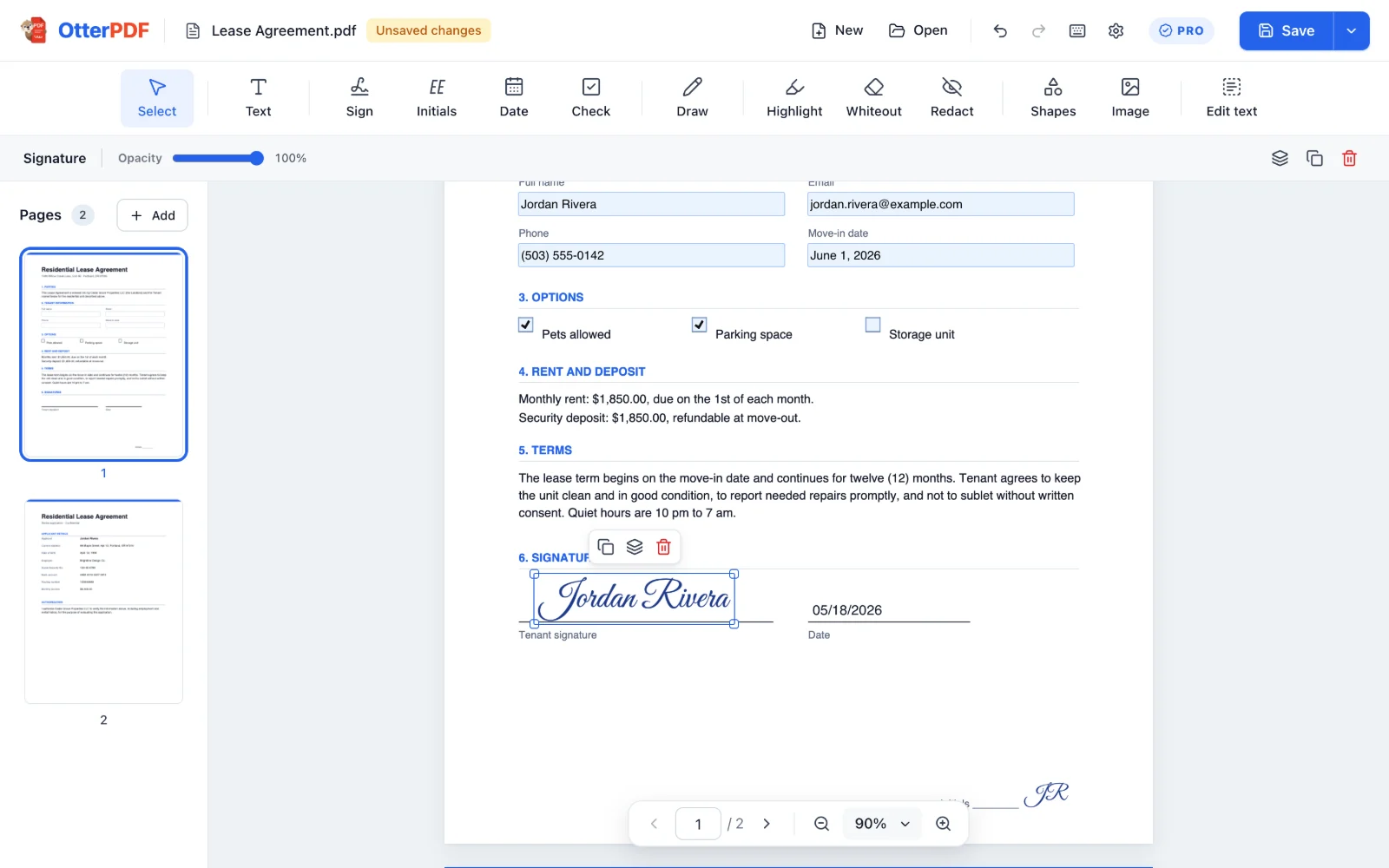
The OtterPDF editor in Chrome with a lease agreement whose form fields are filled in and a signature placed on the signature line
Nothing uploaded PDFs are opened, edited and saved on your computer.
No account Install it and start. No sign-up, no email.
Works offline Edit on a plane or with your Wi-Fi off.
Real PDFs Text stays selectable. No watermarks, ever.

How it works

From “please sign and return” to done in a minute

No new app to learn and nothing to upload. OtterPDF opens right next to your other tabs.

  1. 1

    Add OtterPDF to Chrome

    One click from the Chrome Web Store. Pin it to your toolbar so it's always a click away.

  2. 2

    Open any PDF

    Click the OtterPDF button on a PDF tab, right-click a PDF link, or drop a file from your computer into the editor.

  3. 3

    Edit, then save

    Fill, sign, edit or redact, then press Save. The finished PDF goes straight to your computer.

Features

Everything you need to finish a PDF

Built for the documents in your inbox: leases, contracts, applications and forms.

Free

Fill out any PDF form

Type straight into the form's own fields, or add text anywhere on forms that don't have them.

  • Text boxes, checkboxes, radio buttons and dropdowns
  • Add text, today's date, check marks, crosses and dots
  • The saved PDF stays fillable, or flatten it with Pro
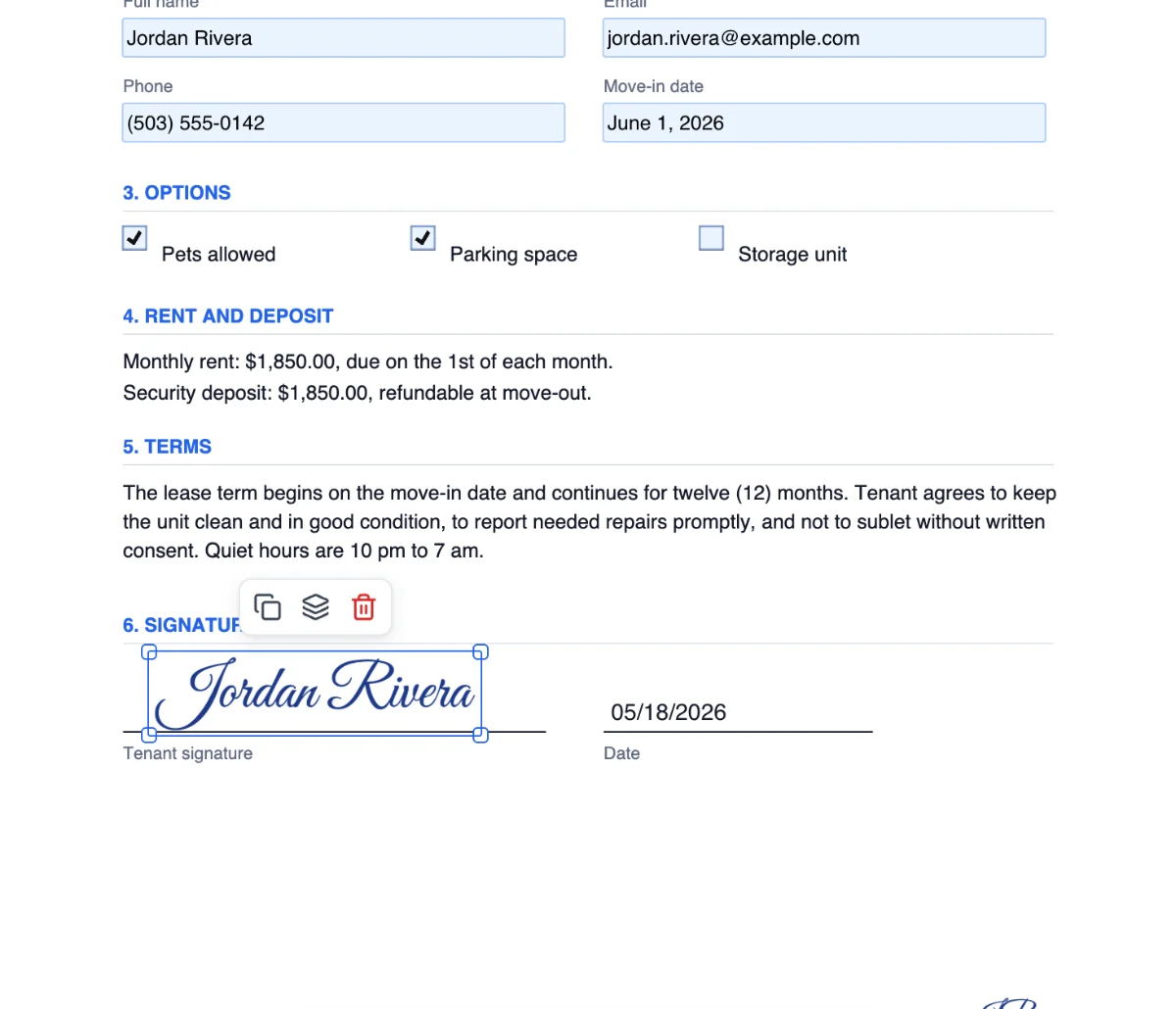
A lease agreement with the tenant's name, email, phone and move-in date filled in, two options checked and a signature on the line
Pro

Sign in seconds

Create your signature once, then drop it on any line. It's ready the next time too.

  • Draw it with a smooth, pen-like stroke
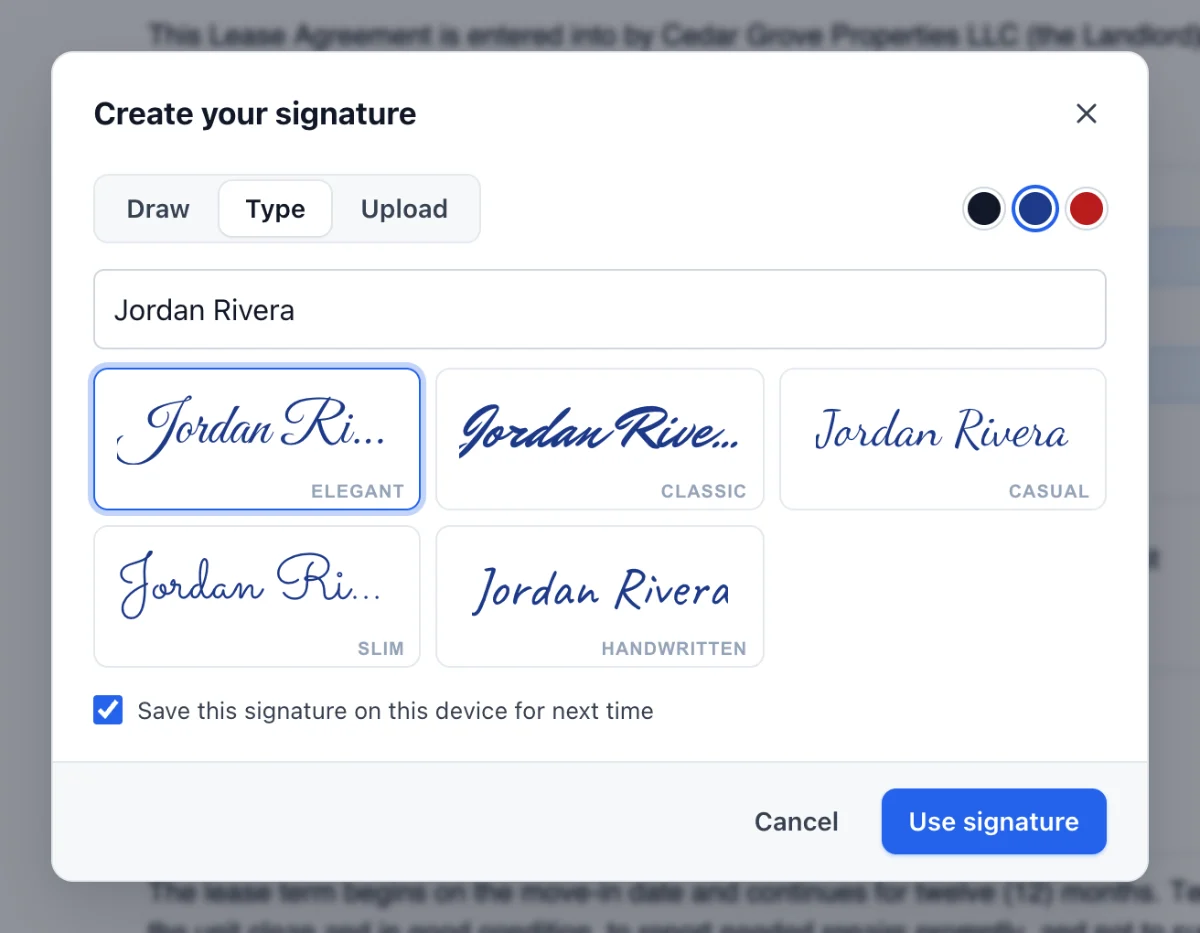
  • Type it in 5 handwriting styles, or upload a photo with the paper background removed
  • Save up to 10 signatures and initials, and use “Sign here” on signature fields
The Create your signature dialog showing the name Jordan Rivera in five handwriting styles
Pro

Edit the text that's already there

Fix a typo, a date or an amount without retyping the whole document.

  • Click any line of text and type over it
  • OtterPDF matches the font style, size and color
  • Unlimited undo, so you can always go back
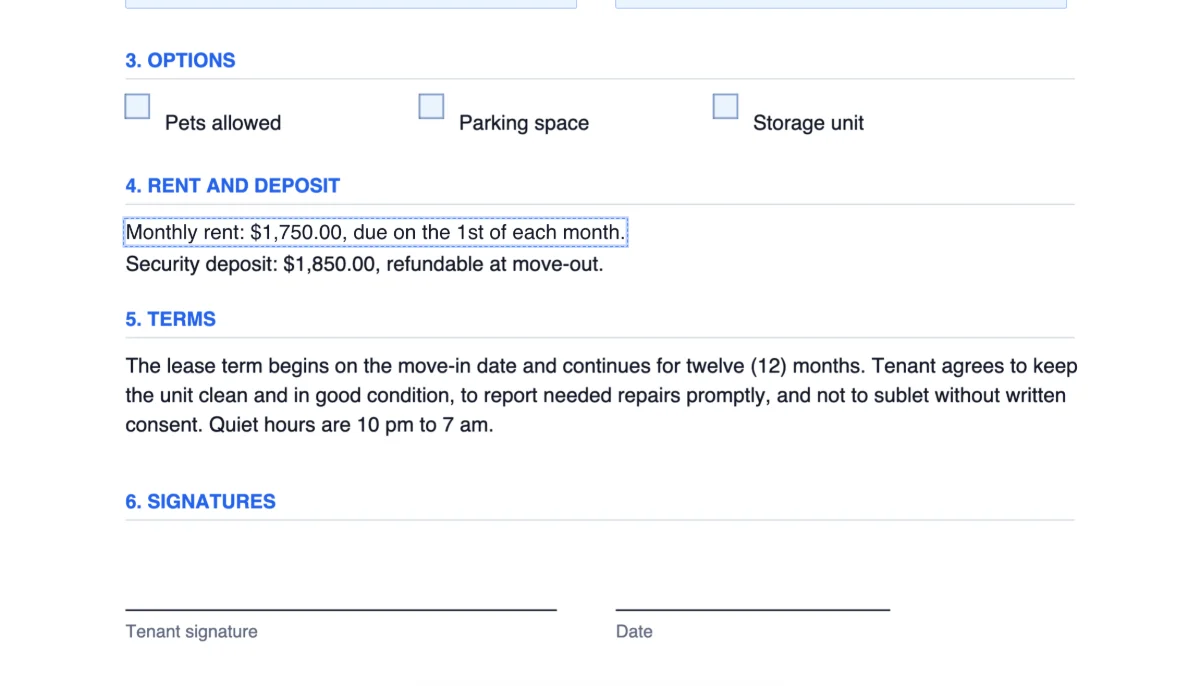
A line in a PDF being edited: the monthly rent changed from $1,850.00 to $1,750.00
Pro

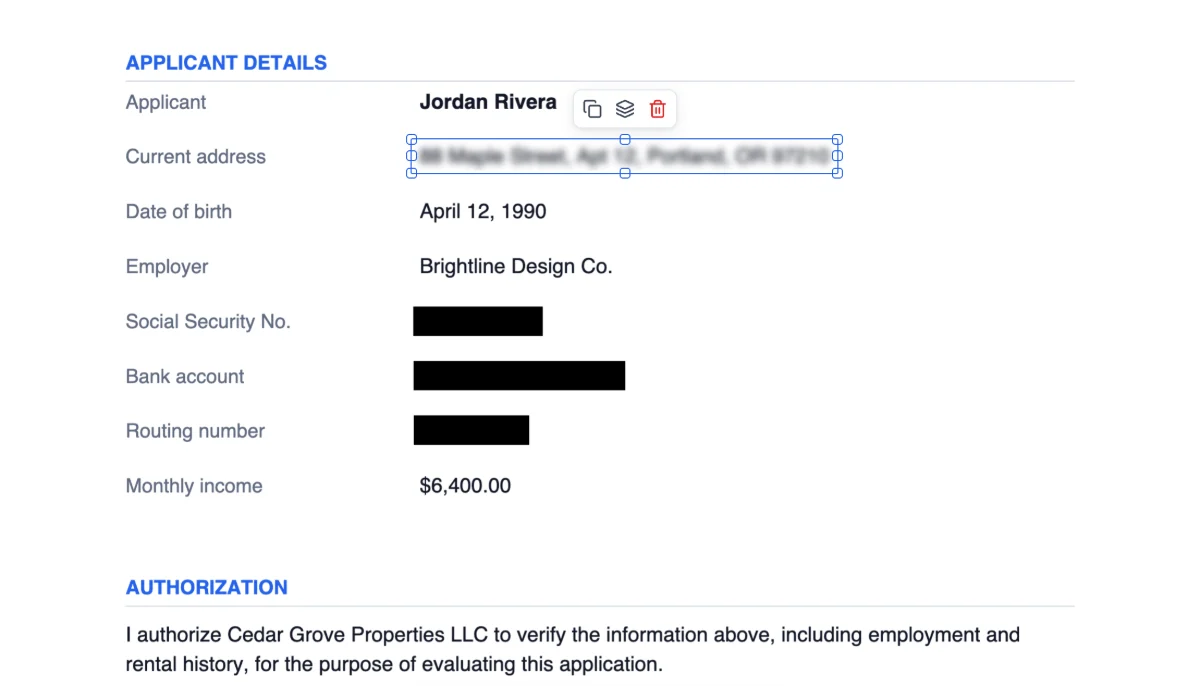
Redact or blur private details

Hide account numbers, Social Security numbers, addresses or names before you share a document.

  • Drag over anything, or click a line of text to cover it exactly
  • Choose a solid box, or a blur with adjustable strength
  • Real redaction: when you save, what's underneath is removed from the file, not just covered
A rental application with the Social Security number, bank account and routing number covered by black boxes and the address blurred

And everything else you'd expect

Organize pages Pro

Merge PDFs, add blank pages, reorder, rotate and delete. Deleted pages are really gone.

Highlight and draw Pro

Real highlighter colors and smooth freehand ink with your mouse, trackpad or pen.

Whiteout Pro

Cover mistakes or old details with a clean box in any color.

Shapes and arrows Pro

Boxes, circles, lines and curved arrows, layered in front or behind just how you want.

Images and logos Pro

Paste or drop a logo, stamp or photo onto any page.

Keep editing later Free

Reopen a PDF you saved with OtterPDF and everything you added is still editable.

Password-protected PDFs Free

Open them with their password. Saved copies stay protected with the same password.

Fast and familiar Free

Unlimited undo and redo, smooth zoom and keyboard shortcuts for every tool.

Privacy

Your documents stay yours

Most online PDF editors upload your file to their servers to work on it. OtterPDF runs entirely inside Chrome on your computer, so your leases, tax forms, medical records and contracts never leave your device.

  • No uploads, no tracking, no ads, and we never sell data
  • Access to a website is asked for only when you open a PDF from it
  • Open source PDF engines run inside the extension, with no remote code
Read the privacy policy
Many online PDF tools OtterPDF
Your file Uploaded to a server Stays on your computer
Account Often required Never
Price Monthly subscription Free, or pay once for Pro
Watermarks and download limits Common on free plans Never
Works offline No Yes

Made for everyday paperwork

For the documents you'd rather not upload

Renters and homeowners

Leases, move-in checklists and HOA forms.

Freelancers and small business

Contracts, quotes, invoices and NDAs.

HR and onboarding

Job applications, onboarding packets and tax forms.

Parents and students

Permission slips, school forms and applications.

Sensitive records

Medical, legal and financial paperwork, redacted before you share it.

Pricing

Start free. Upgrade once if you need more.

No subscription and no surprise charges. Saving and downloading are always free.

Free

$0forever

Everything you need to fill out forms.

  • Open and view any PDF
  • Fill in form fields
  • Add text, dates and check marks
  • Unlimited saves, no watermarks
  • Password-protected PDFs
  • Keep edits editable for later
Add to Chrome

FAQ

Questions, answered

Is OtterPDF free?

Yes. The free plan lets you open any PDF, fill in its form fields, add text, dates and check marks, and save as often as you like, with no watermarks. OtterPDF Pro is a one-time upgrade that adds signing, text editing, redaction, markup and page tools.

Are my PDFs uploaded anywhere?

No. OtterPDF opens, edits and saves your PDFs inside Chrome on your computer. Your documents are never sent to us or to anyone else. The only time OtterPDF goes online by itself is to check whether you've bought Pro, and that check never includes your files.

Can I sign a PDF with OtterPDF?

Yes, with OtterPDF Pro. Draw your signature, type it in one of five handwriting styles, or upload a photo of it. You can save up to 10 signatures and initials and place them with one click, and “Sign here” buttons fill signature fields for you.

Can I edit the existing text in a PDF?

Yes, with OtterPDF Pro. Click a line of text in the PDF and type over it. OtterPDF matches the font style, size and color as closely as it can. It works on horizontal text, one line at a time.

Is redaction permanent?

Yes. When you save, every page with a redaction is rebuilt as an image with the area blacked out or blurred, and the original text, images and form data on that page are removed from the file. Use “Save as…” if you want to keep an unredacted copy too. (Whiteout only covers content, so use Redact for anything private.)

Does OtterPDF work offline?

Yes. Once it's installed, you can open, edit and save PDFs from your computer without an internet connection, and Pro keeps working too.

Will the PDF still work in other apps?

Yes. OtterPDF saves standard PDFs that open anywhere. Text stays selectable (except on redacted pages), and fillable forms stay fillable unless you choose to flatten them.

How much does Pro cost, and is it a subscription?

OtterPDF Pro is a one-time payment of $19.99 at launch. There's no subscription: pay once and it's yours. You upgrade from inside the extension, and checkout is handled securely by Stripe through ExtensionPay.

Can I use Pro on another computer?

Yes. Install OtterPDF in Chrome on the other computer, open Settings, choose “Restore purchase” and sign in with the email you used to buy Pro.

Which browsers does OtterPDF work in?

OtterPDF works in Google Chrome version 116 or newer on Windows, Mac, Linux and ChromeOS. Chrome extensions don't run on phones or tablets.

Your next PDF, done in a minute

Fill, sign, edit and redact without uploading a thing.